How to Beat the Pufferfish Boss in How to Fish
Updated 2026-08-25
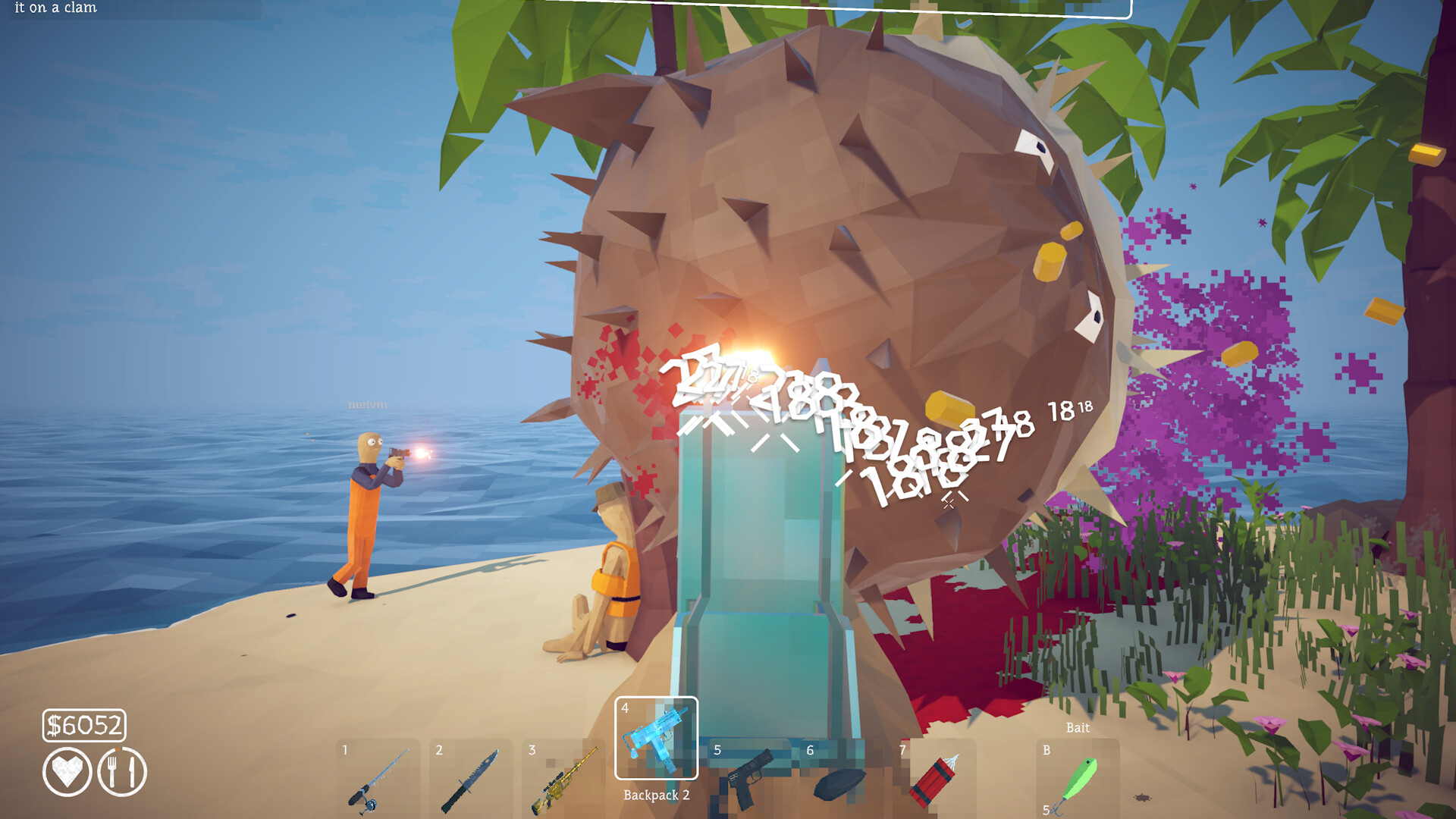
Unlock the Pufferfish with the Carrot, prepare cooked fish, kite its rolling charge, avoid the phase-two poison cloud, and preserve its trophy.
Unlock the Pufferfish and obtain the Carrot
The Pufferfish does not use an ordinary shop lure. Third-party field testing describes a Vacation or Tourist quest on Island 3: catch a valid endangered species with the Standard Lure, hand it to the Tourist, and receive a Carrot. Reported valid targets include Needlefish, Boxfish, or Seahorse, but the current objective text is the authority if a patch changes the accepted list. Complete the local grill quest as well, because cooked catches provide the practical healing supply used during the fight. Do not cast the Carrot until equipment, food, and inventory space are ready.
Prepare food, space and controllable damage
Cook more fish than you expect to consume and remove each one before it burns. Keep healing in a predictable slot so taking damage does not turn into an inventory search. Community guides recommend a well-upgraded Uzi for sustained fire, while Steam discussions also mention shotguns and other automatic setups. No single upgrade level is an official requirement. Choose the weapon you can keep on target while moving, test its reload on an ordinary creature, and identify a wide loop around trees or solid cover before starting.
Dodge the rolling charge sideways
The Pufferfish commits to a direct rolling charge. Moving sideways out of its projected line is safer than backing straight away, which can keep you inside the same attack path. Once the boss passes, turn, fire during the recovery window, then resume the loop instead of chasing. Trees can interrupt a charge and create space, but they can also trap the player; circle a known piece of cover with a repeatable route rather than improvising between several obstacles. Heal after a meaningful hit instead of waiting until the next collision would be fatal.
Adapt to the purple poison cloud
Community footage and written testing describe a second phase near half health in which the boss trails a purple poison cloud. The basic charge continues, but crossing behind the Pufferfish becomes dangerous because the cloud occupies its recent path. Widen the circle, route around the outside of the trail, and give up a damage window rather than cutting through poison. The target may also become physically larger, so spacing that felt comfortable early can shrink later. Preserve the same dodge-fire-heal rhythm while increasing distance.
Solo and co-op positioning
Solo players must manage the entire attack cycle, making food count and consistent movement especially important. In co-op, the targeted player should keep the boss moving along the agreed loop while teammates fire from separated angles. Do not stack everyone behind one tree: a single charge can cross the group, and crossed escape routes create collisions. Revive only after the boss has committed away from the downed player. These are community-tested tactics, not guarantees that health or targeting scales identically in every patch.
Protect the correct trophy after the win
Stop before cooking or selling anything. A Steam discussion documents players confusing ordinary Pufferfish chunks with the distinctive bone, tail, or half-fish-shaped progression trophy. Search the death point and the direction of the final hit, reserve an inventory slot for the unusual piece, and return it to the quest NPC before handling normal loot. If the NPC refuses the item, inspect every distinctive drop, search the shoreline and boat, and confirm the host retained the trophy in co-op.
Fix a route that remains locked
Confirm the active objective changed after the kill, hold the trophy while speaking to the correct NPC, and look for the coordinate, tablet, radar, or travel update that completes the hand-in. Do not rely only on the death animation. If the route remains locked, record the installed version, solo or co-op state, host identity, trigger sequence, and item held. Preserve the save before retrying. Avoid replacement saves or unknown tools advertised as instant progression fixes.
How to apply this guide safely
Begin with “Unlock the Pufferfish and obtain the Carrot” and compare it with the objective, inventory, and controls shown by your installed build. Do not change several variables at once. If the guide concerns progression, complete one dialogue or hand-in and confirm the objective changed before sailing away. If it concerns combat, test the control or equipment choice on an ordinary encounter before spending a boss trigger. If it concerns troubleshooting, preserve the save and start with reversible checks such as restarting the session and verifying files.
Keep a short run record with the game version, solo or co-op state, host identity, starting objective, relevant equipment, steps taken, and outcome. Physics, network state, and retail patches can make two attempts look different even when both players describe them honestly. A controlled record lets you identify which condition changed. It also gives the developer a useful reproduction if the result points to a defect rather than a missed quest step.
Evidence and version check
This article uses Steam Discussion — beating the pufferfish, Steam Discussion — pufferfish trophy hand-in, GAMES.GG — How to Beat the Pufferfish. Official store text and developer announcements establish supported features and broad progression. Steam achievement wording establishes that a named action exists, but it does not prove an exact coordinate, probability, price, damage value, or hidden timer. Community discussions can reveal a repeated problem and possible workaround, but one reply is not treated as a universal mechanic. Where evidence stops, the guide uses cautious testing steps instead of inventing a precise answer.
Before relying on an older route, check the Steam news and discussion dates against the updated date at the top of this page. Prefer the current in-game objective when it conflicts with a video or forum post. Avoid unknown executables, replacement saves, cheats, or destructive file edits offered as shortcuts. A legitimate workaround should be explainable, reversible, and testable without surrendering account credentials or deleting the only known-good save.
Completion check
Finish with “Fix a route that remains locked,” then verify the result in the system that matters: quest log for progression, inventory for items, Steam for achievements, or a repeatable symptom check for a technical fix. Do not treat a visual animation alone as proof that the save registered the event. Wait for a normal transition and inspect the state before selling items, changing hosts, or starting another objective. If the result differs from this page, send the URL, build number, exact steps, and observed result through the contact page; that evidence is how we correct guides without turning uncertain reports into false facts.
Sources & Evidence
Claims are backed by the following sources. Unknowns are marked explicitly.
- Steam Discussion — beating the pufferfishCommunity / Tier 2-3Checked 2026-08-25
- Steam Discussion — pufferfish trophy hand-inCommunity / Tier 2-3Checked 2026-08-25
- GAMES.GG — How to Beat the PufferfishThird-party / Tier 4Checked 2026-08-25